 ScissorCV
Questions and answers
ScissorCV FAQ
Everything people ask before trusting a resume tool with their career — pricing, privacy, providers, and what the score really means.
The short answer: ScissorCV is a Chrome and Edge extension that tailors your resume to a job description, scores the match honestly, and refuses to add skills your resume cannot support. Five free runs, then $19 once. Your resume never leaves your browser except to the AI provider you choose.
free tailoring runs, no card
one-time lifetime, no subscription
servers holding your resume
supported AI providers, free-first
Basics
What is ScissorCV?
ScissorCV is a Chrome and Edge extension (Manifest V3) that tailors your resume to any job description, shows an honest ATS-style keyword match score, and blocks the AI from inventing skills you cannot defend. It runs as a browser side panel next to the job posting you are applying to, using your own AI provider key, so your resume is never uploaded to a ScissorCV server.
Beyond tailoring, it generates cover letters, maps your skills to job requirements with evidence, switches between regional CV formats, autofills application forms, and keeps a history of every application.
Does ScissorCV work on LinkedIn, Indeed and other job boards?
Yes. ScissorCV works on any normal job posting page you can open in your browser, including LinkedIn, Indeed, Glassdoor, Naukri, ZipRecruiter, Greenhouse, Lever, Workday, SmartRecruiters and company career pages. You can either click “Grab from page” to capture the job description from the active tab, or paste the text in manually.
Browsers block extensions from running on a few restricted pages — chrome:// pages, the Chrome Web Store, and the built-in PDF viewer. On those, paste the job description instead of grabbing it.
Which browsers does ScissorCV support?
ScissorCV runs on Chrome, Microsoft Edge, Brave and other Chromium-based browsers that support Manifest V3 side panels. Safari and Firefox are not supported today.
Do I need to create an account?
No. There is no signup, no email capture and no login. ScissorCV has no backend, so there is no account to create — you install the extension, connect an AI provider key, and start.
How long does tailoring a resume take?
A single tailoring run typically completes in well under a minute, depending on the AI provider and model you selected. NVIDIA NIM is the recommended default partly because it is fast as well as free to start with.
Privacy and your data
Does ScissorCV store my resume on a server?
No. ScissorCV operates no servers and never receives, stores or sees your data. Your resume, job descriptions, profile details, screening answers, API keys and application history are saved in your browser's local extension storage (chrome.storage.local) on your own device.
There is no hosted resume database, no analytics and no tracking. Read the full privacy policy.
Where does my data go when I click generate?
Your resume text and the target job description are sent directly from your browser to the AI provider you configured, authenticated with your own API key. ScissorCV is not an intermediary and the data does not pass through any server the developer controls. Your use of that provider is governed by the provider's own privacy policy.
Is my API key safe?
Your API key is stored locally on your device and is sent only to the provider it belongs to, solely to authenticate your own requests. It is never transmitted to, logged by, or accessible to the developer.
What can the autofill helper see?
The autofill helper is injected into a page only when you click “Autofill this application”. It reads the form fields on that page and fills blank ones from details you saved locally. It does not send page content or your details to anyone. ScissorCV requests activeTab rather than blanket access to every site you visit.
How do I delete my data?
Because everything is local, you are in full control: use Reset to clear your resume and job description, delete individual applications from the Dashboard, or uninstall the extension to remove all locally stored data. There are no copies to request deletion of, because none were ever collected.
AI providers and cost
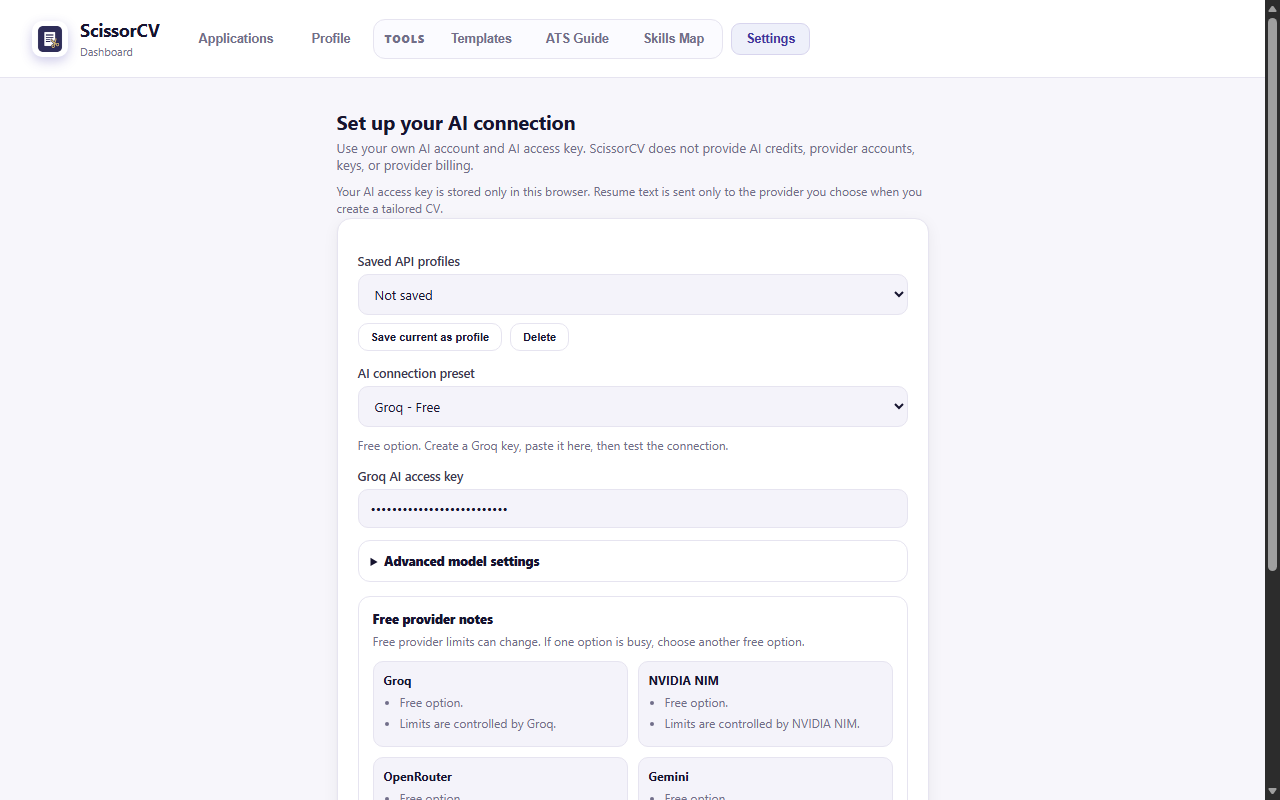
Why do I need my own AI provider key?
Because you bring the AI account, ScissorCV does not have to resell tokens and become another monthly AI subscription. You keep control of which model runs, what it costs and what quota you have — and the pricing can stay at a one-time $19 lifetime instead of $30–50 per month.
Which AI providers does ScissorCV support?
ScissorCV supports NVIDIA NIM (the recommended free default), Groq, OpenRouter, Google Gemini, OpenAI, Anthropic Claude, Azure OpenAI, and any local OpenAI-compatible server such as Ollama or LM Studio. Onboarding shows free-first options so you are not asked for a credit card to try it.
How much does the AI actually cost me?
Most users pay nothing for the AI. The free tiers on NVIDIA NIM, Groq and Google Gemini are generally enough for normal job-search volume. If you connect a paid provider such as OpenAI, Claude or Azure, a tailoring run costs a few cents at typical resume and job-description lengths.
Can I run ScissorCV with a local model, fully offline?
Yes. Point ScissorCV at any local OpenAI-compatible server (Ollama, LM Studio, or your own endpoint) and the generation stays on your machine. ScissorCV also bundles local embedding assets and a compiled skill ontology, so parts of matching and analysis work without any network call at all.
Which model should I choose?
Start with the NVIDIA NIM default. Larger models generally produce better prose, but because Truth Guard validates every generated claim against your real resume, model choice affects writing quality far more than it affects honesty.
Features and honesty
Will ScissorCV invent skills or experience I do not have?
No — preventing that is the point of the product. Generated output is parsed into a strict resume schema and compared against your source resume by a component called Truth Guard. Unsupported facts, job titles, employers, dates and skills are blocked and surfaced as gaps or confirmation items instead of being quietly added to your CV.
If a job wants SQL ownership or Marketo administration and your resume does not support it, ScissorCV tells you that it is missing rather than writing it in.
What is Truth Guard?
Truth Guard (also called the Truth Firewall) is a deterministic validation layer that runs after the AI and before you see a result. It builds an evidence ledger from your saved resume, profile, confirmed claims and achievement bank, then validates every generated claim against that ledger. The AI writes candidate output; ordinary code decides what can be trusted, what must be confirmed by you, and what stays a gap.
How accurate is the ATS score?
The score is confirmed keyword coverage: weighted job-description terms found in your resume by literal or alias match. It is intentionally conservative and it is not a real Workday, Greenhouse or Taleo score — no third-party tool has access to those. Semantic hints can explain a gap but never inflate the number. See the full methodology.
Does ScissorCV write cover letters?
Yes. Cover letters are generated from the same evidence ledger as the resume, so they are subject to the same anti-fabrication checks. You can generate one alongside each tailored resume and it is saved with that application.
What is the Skills Map?
The Skills Map is a personal capability graph. It connects your roles, skills, tools, projects and evidence so you can see what your resume actually proves versus what it merely implies. Nodes are marked as evidenced, implied, confirmed or manual, which is what makes the difference between a real claim and a stretch visible.
Can ScissorCV produce UK, European or Indian CV formats?
Yes. ScissorCV treats different markets as different document expectations and includes renderers for US resume, UK CV, EU Europass-style, India technical CV, Canada and Australia/New Zealand. See how the formats differ.
Does it track my job applications?
Yes. Every generated resume, cover letter and ATS report is saved to a local application history in the dashboard, along with the role, company and token usage, so you can reopen or reuse any past application.
What is Fit Preview?
Fit Preview shows requirement-by-requirement status for a job before you commit to a full generation — what is covered, what is weak, what is missing and what would be risky to claim. It is the fastest way to decide whether a role is worth applying to.
Pricing
Is ScissorCV free?
You get 5 free resume tailoring runs with no card required. After that, ScissorCV is a one-time $19 lifetime purchase at founder pricing — there is no subscription and no renewal. You also need an AI provider key, and the recommended default (Groq) has a free tier.
What does the $19 lifetime licence include?
Everything in the extension: unlimited tailoring runs, cover letters, Truth Guard, the honest ATS report, Skills Map, Fit Preview, regional CV formats, templates, autofill, the ATS Guide and application history — plus future updates. One payment, no recurring charge.
How does payment work?
Checkout is handled entirely by Dodo Payments. Only a licence key and a device label are exchanged to activate your purchase. The developer never receives or stores your card details.
Why is ScissorCV so much cheaper than Jobscan or Teal?
Because you supply the AI key and all storage is local, there are no server or token costs to recover through a subscription. Jobscan Premium is listed at $49.95/month and Teal+ at $13/week or $29/month (verified July 2026); ScissorCV is $19 once. See the full comparisons.
Troubleshooting
The side panel is blank or the extension stops responding
This almost always means the extension was reloaded or updated while old tabs were still open. Refresh the job posting tab, then reopen the side panel. If it persists, disable and re-enable ScissorCV on chrome://extensions and refresh.
It says the job description was not detected
Some postings load their content in ways a content script cannot read, and browsers block extensions entirely on restricted pages such as chrome:// URLs, the Chrome Web Store and the built-in PDF viewer. Select the job description text and paste it into the side panel instead — tailoring works identically.
I am getting a provider or timeout error
Check three things in order: that the API key is pasted correctly with no trailing space, that the selected model is still available on that provider, and that you have not hit the provider's free-tier rate limit. ScissorCV surfaces the provider's own error message, and switching to another configured provider is the fastest workaround.
My resume came out too long or a section is missing
Raise the output cap for your provider in settings, or shorten the source resume. Truncation is usually the model hitting a token limit rather than content being dropped deliberately — ScissorCV flags incomplete generations rather than saving a partial resume as if it were finished.
Still stuck?
Email rohanmalodia@gmail.com and describe what you saw, which provider you used, and which browser. There is no support portal to sign into.