 ScissorCV
Chrome & Edge extension
Tailor your resume without inventing experience
An honest ATS match score, a resume that stays on your machine, and an AI that is not allowed to lie on your behalf. Five free runs, then $19 once.
ScissorCV is a free Chrome and Edge extension that tailors your resume to any job description, shows an honest ATS-style keyword match score, and blocks the AI from inventing skills you can’t defend. It runs in your browser using your own AI provider key — NVIDIA NIM, Groq, OpenRouter, Gemini, OpenAI, Claude, or Azure — so your resume is never uploaded to a ScissorCV server. Five free runs, then $19 lifetime.
Add to Chrome — 5 free runsHow the score works
Works in Chrome, Edge, Brave and other Chromium browsers. No signup. No card. v2.89.51.
5
free tailoring runs, no card
$19
once, lifetime — no subscription
0
servers, databases or analytics
8
AI providers, including free ones
How does ScissorCV tailor a resume to a job description?
Six steps, all of them inside your browser.
Open a job posting
LinkedIn, Indeed, Glassdoor, Naukri, ZipRecruiter, Greenhouse, Lever, Workday or a company careers page. Open the side panel; the description is read from the tab you are already on.
Paste your resume once
It is stored in your browser’s local extension storage and reused for every future application. You never re-upload it.
ScissorCV extracts the requirements
Your chosen model pulls out the hard skills, tools, responsibilities and seniority signals, then maps them against what your resume can actually evidence.
Truth Guard checks every claim
Before anything is shown to you, each generated line is validated against your real evidence. Unsupported skills, employers, titles, certifications and invented metrics are blocked, not softened.
You get a tailored resume and a score
A rewritten resume in the format you picked, an honest keyword match score, a list of genuine gaps, and an optional cover letter.
Apply, and autofill the form
One click fills the application form from your saved profile. The run is logged in local history so you can see what you sent and to whom.
What it actually looks like
Real screens from the extension, not mockups. Every number below came out of a real run.
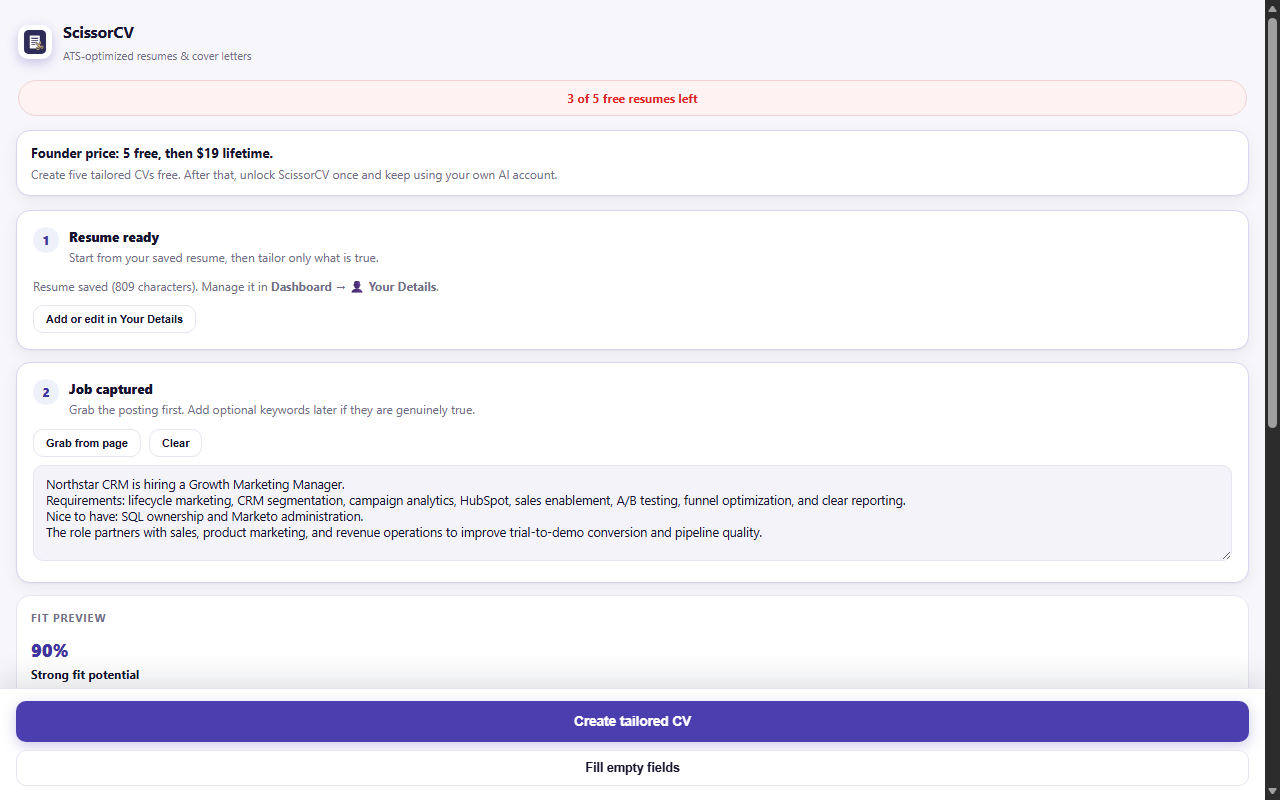
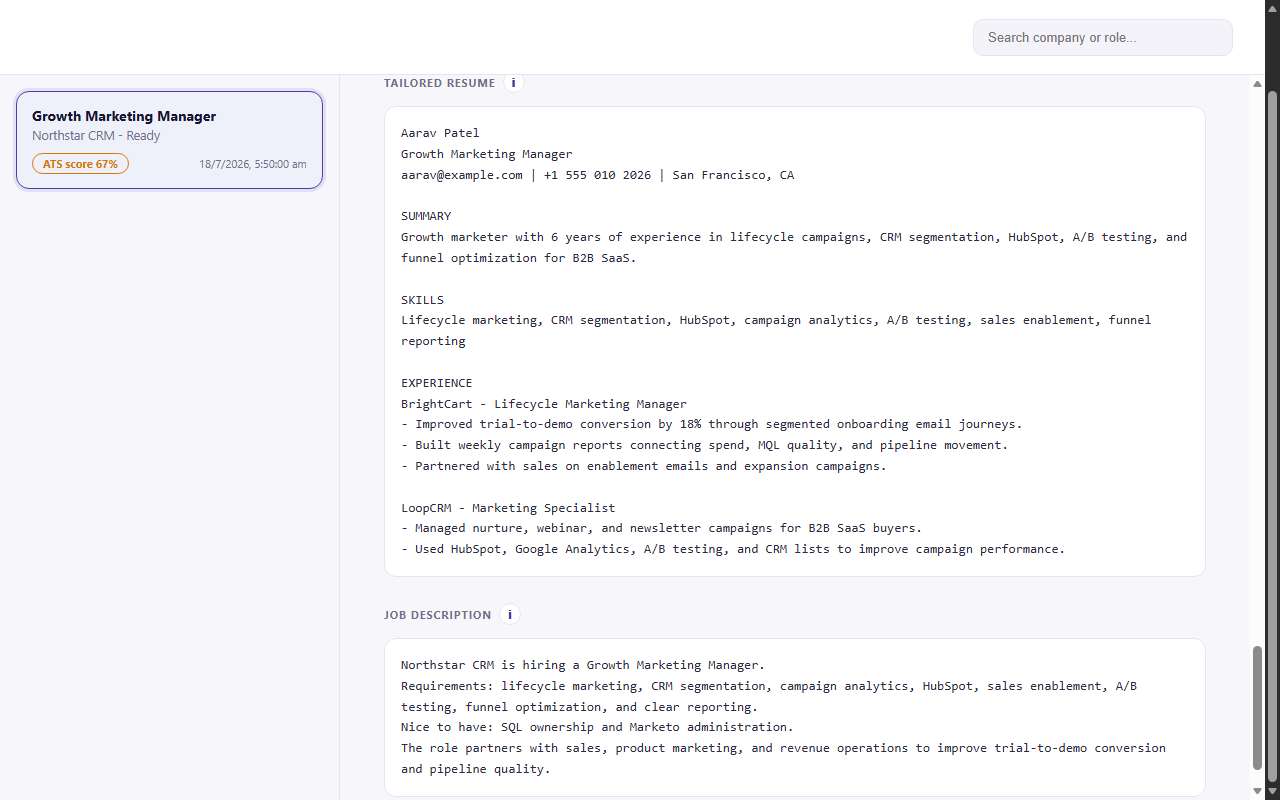
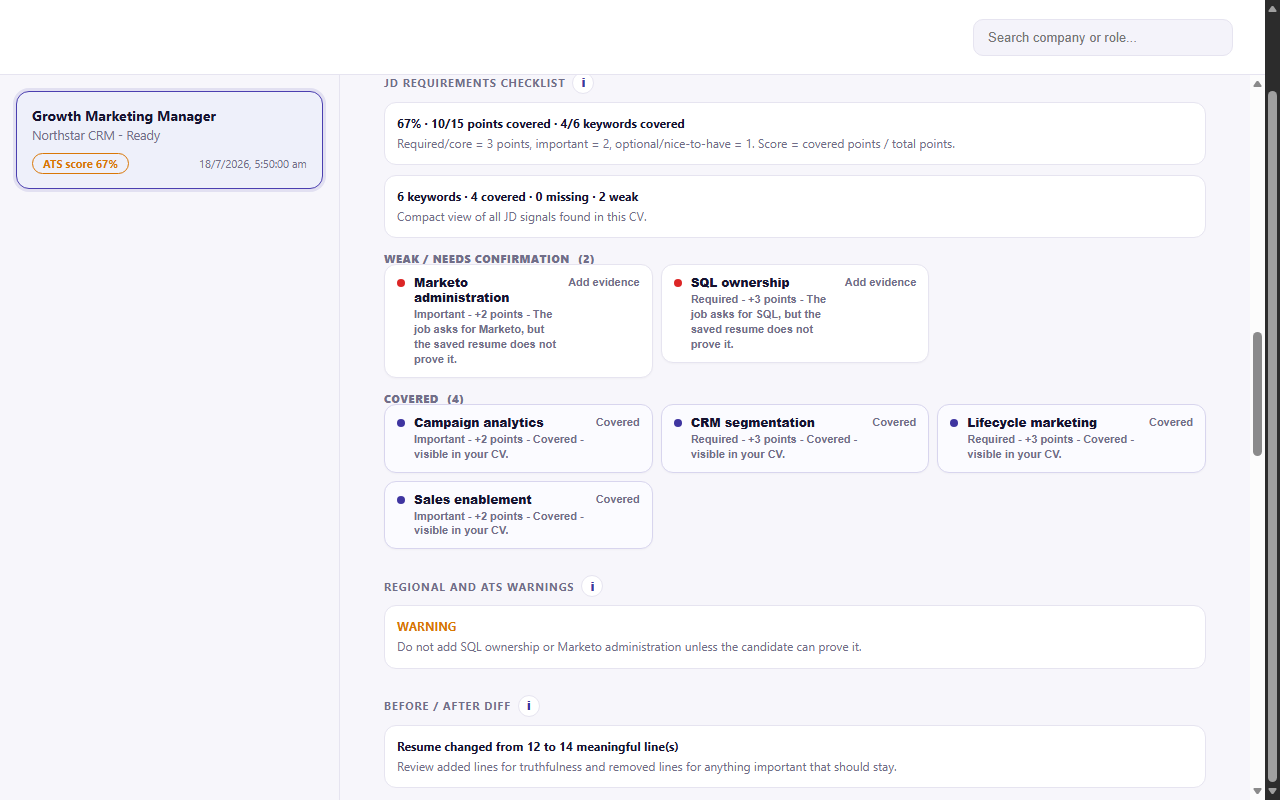
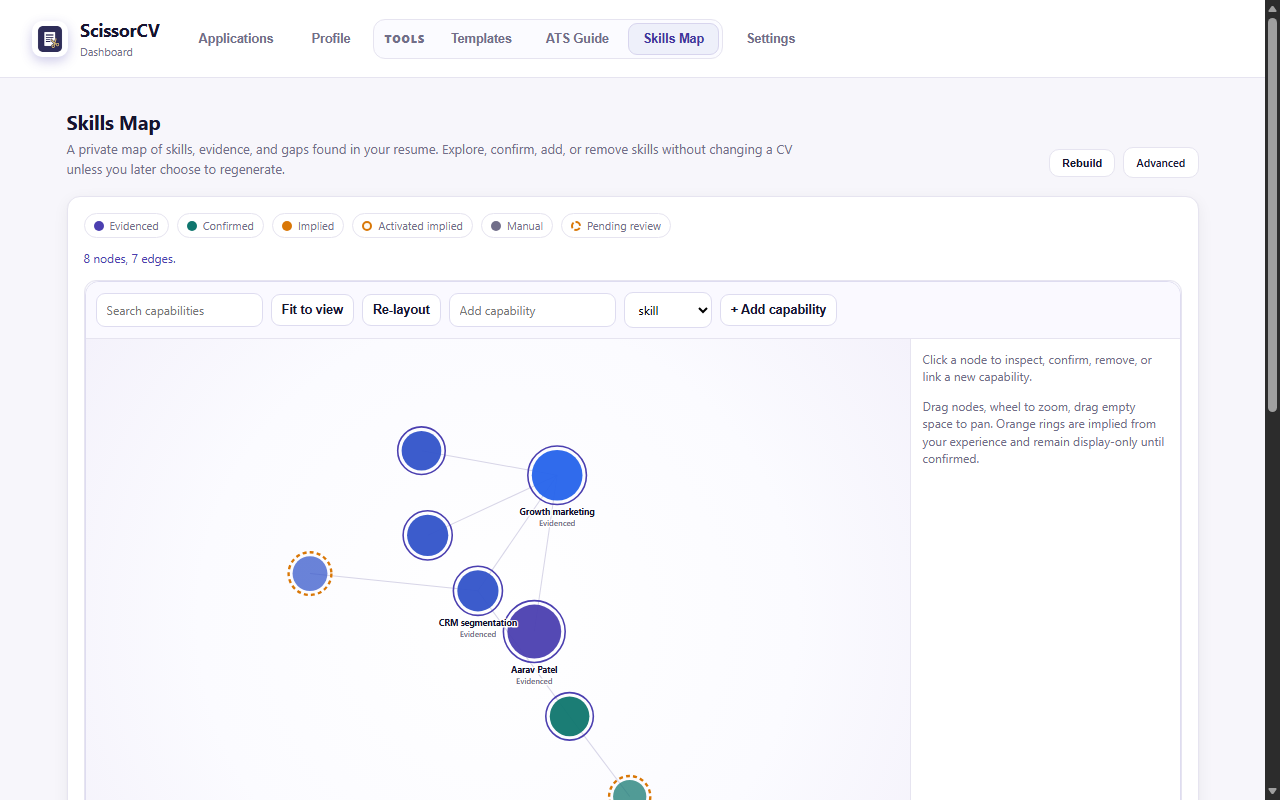
Will it make up skills for me?
No. That is the entire point of the product. Most AI resume tools optimise for a higher score, which means the fastest path is to claim things you cannot defend in an interview. Truth Guard sits between the model and your screen and rejects any claim your evidence does not support.
You get three things instead of a flattering lie: the claims that survived validation, the gaps where you genuinely do not match, and confirmation items — things you may well have done, phrased as a question for you to approve rather than assumed.
How is the ATS match score calculated?
By literal and alias keyword coverage against the posting, weighted by where each term appears and how central it is to the role. Semantic similarity is computed locally and shown as advice, but it never moves the number, because a score you cannot explain is a score you cannot act on.
No tool can read a real applicant tracking system’s internal ranking, and any product implying otherwise is guessing. Read the full methodology, including what it deliberately does not count.
Which AI providers does ScissorCV support?
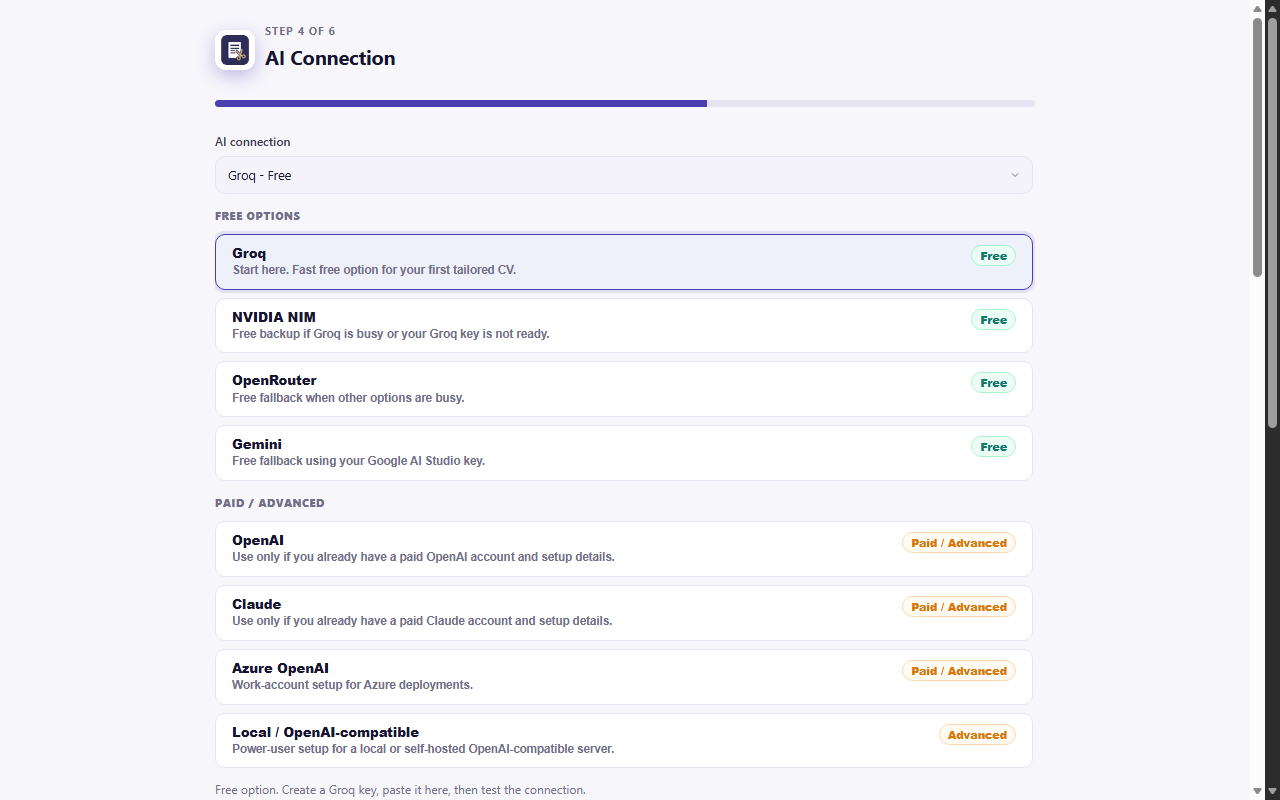
Eight, and you can switch at any time. Free-tier providers are labelled as free in the picker, so you are never nudged towards a paid one.
| Provider | Cost | Notes |
|---|---|---|
| NVIDIA NIM | Free tier | Recommended default. Free tier covers normal job-search volume. |
| Groq | Free tier | Fast free alternative if NVIDIA NIM is rate-limited. |
| OpenRouter | Free and paid | One key, many models, including free ones. |
| Google Gemini | Free tier | Generous free quota, good long-context handling. |
| OpenAI | Paid | Use your own key; costs a fraction of a cent per run. |
| Anthropic Claude | Paid | Strongest prose quality for cover letters. |
| Azure OpenAI | Paid | For people who must stay inside a corporate tenant. |
| Local (Ollama, LM Studio) | Free | Any OpenAI-compatible endpoint. Nothing leaves your machine at all. |
Where does my resume actually go?
To the provider you chose, and nowhere else. ScissorCV has no server, no database, no analytics and no telemetry. Your resume, job descriptions, saved profile, API key and application history are held in your browser’s local extension storage, and uninstalling the extension deletes all of it.
Permissions are limited to what is needed: local storage, the active tab when you click, script injection for autofill, the side panel, and network access restricted to AI provider endpoints. Read the full privacy policy.
Can it write cover letters and other CV formats?
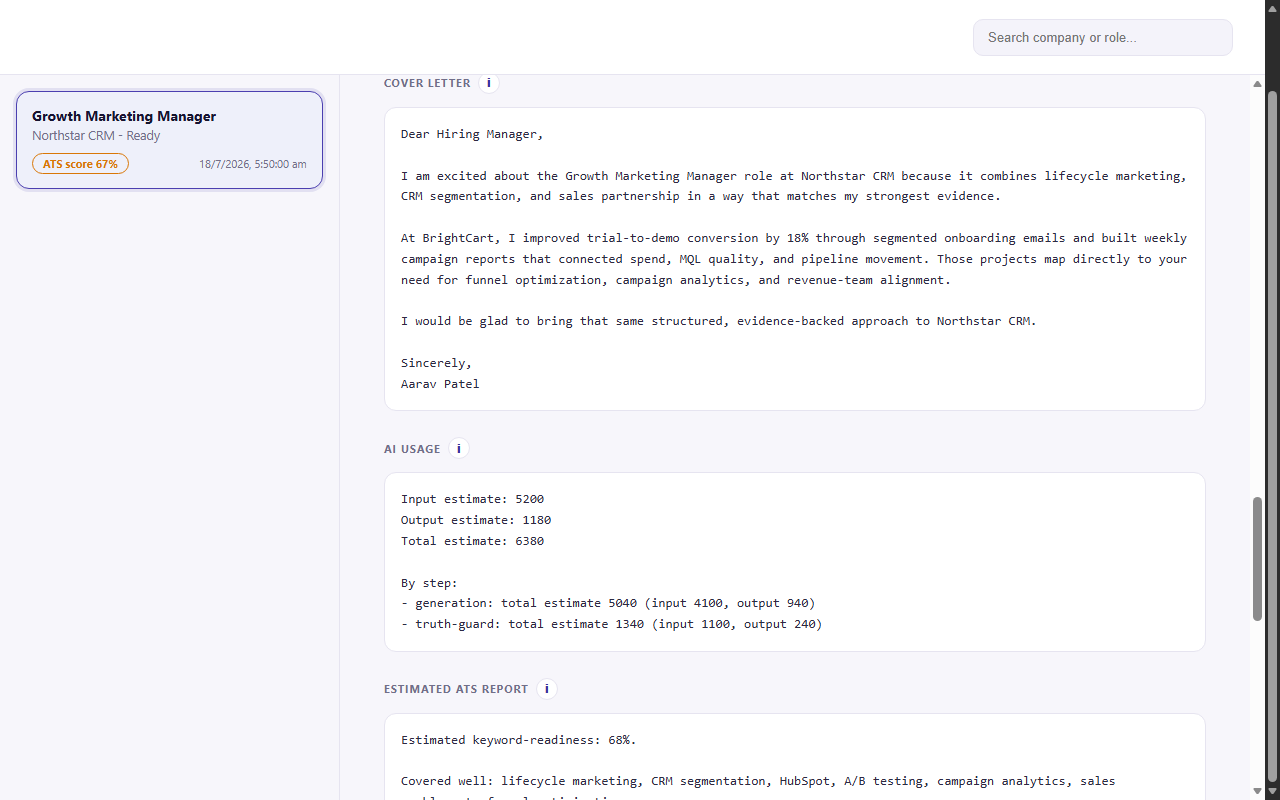
Yes. Cover letters are drafted from the same validated evidence as the resume, so they cannot claim anything the resume does not support. Six regional layouts are built in — United States, United Kingdom, EU Europass-style, India, Canada, and Australia / New Zealand — each rendered properly rather than restyled with CSS, so the parsed text order stays correct. See the format conventions.
The Skills Map builds a capability graph from your history, so a skill you evidenced in one job can be matched to a posting that names it differently. Fit Preview shows how you score against a role before you spend a run on it.
How is ScissorCV different from Jobscan and Teal?
| ScissorCV | Jobscan | Teal | RankResume | |
|---|---|---|---|---|
| Price | $19 once | $49.95/mo | $29/mo | ~$0.53/resume |
| Cost over 12 months | $19 | $599.40 | $348 | varies |
| Rewrites your resume | Yes | Mostly analysis | Yes | No, scoring only |
| Resume stays on device | Yes | No | No | No |
| Blocks invented skills | Yes | No | No | No |
| Needs your own AI key | Yes | No | No | No |
Competitor pricing verified 30 July 2026 from each vendor’s own pricing page. See the full comparisons, including where those tools beat ScissorCV.
What ScissorCV does not do
- It does not guarantee interviews, callbacks or ATS success, and it never will claim to.
- It does not read any real applicant tracking system’s internal score.
- It does not work without an AI provider key, though free ones are fine.
- It does not run on
chrome://pages, the Chrome Web Store, or the built-in PDF viewer. - It does not sync between devices, because there is no server to sync through.
- It does not optimise a LinkedIn profile; Jobscan is better at that.
What does it cost?
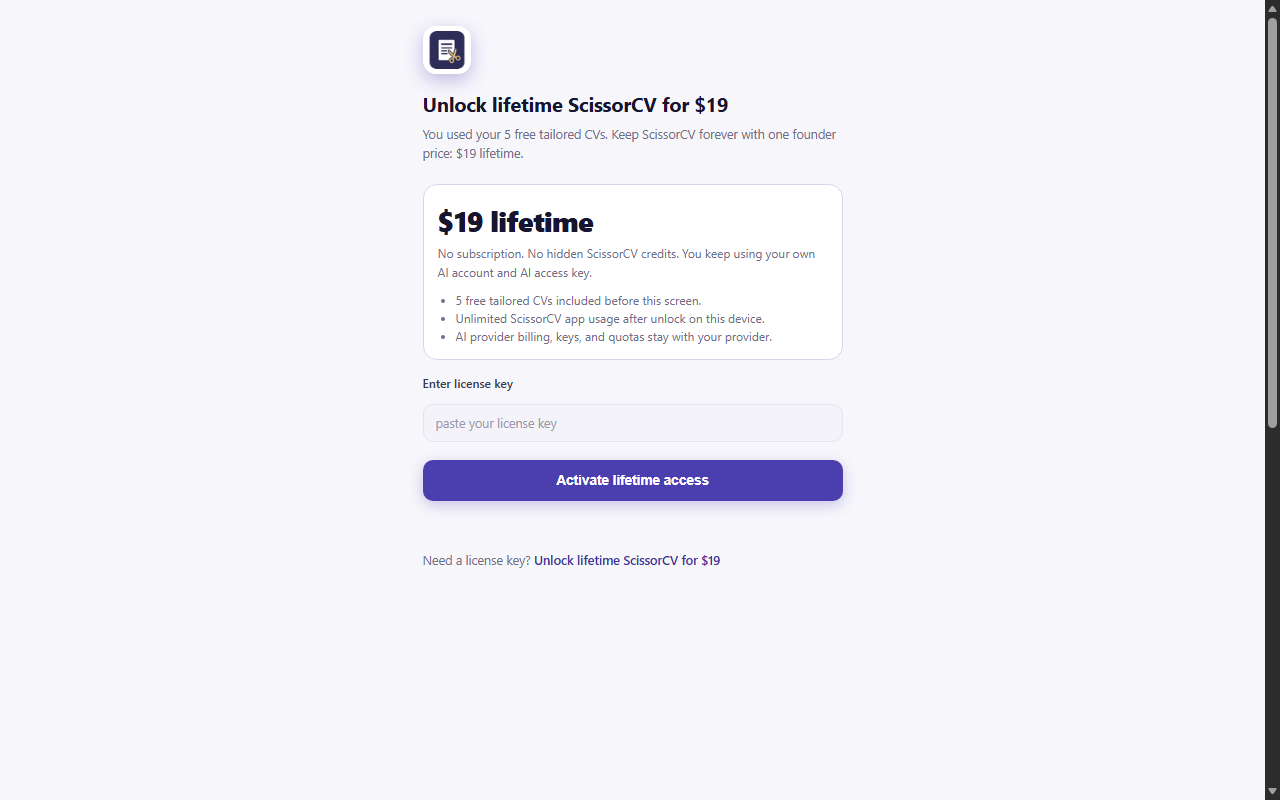
| Plan | Price | What you get |
|---|---|---|
| Free | $0 | 5 full tailoring runs, all features, no card and no signup |
| Lifetime | $19 once | Unlimited runs forever, all future updates, one payment |
| AI usage | Usually $0 | Your own provider key. NVIDIA NIM, Groq and Gemini free tiers cover normal job-search volume |
Payments are handled by Dodo Payments. ScissorCV stores only your licence key and a device label — never card details.
Common questions
More detail on all of these, plus troubleshooting, is on the FAQ page.
Is ScissorCV free?
Yes for the first five tailoring runs, with no card and no signup. After that it is $19 once for lifetime access — not a subscription. You also need an AI provider key, and NVIDIA NIM, Groq and Gemini all have free tiers that cover normal job-search volume.
Why do I need my own AI provider key?
Because there is no ScissorCV server. Your resume goes straight from your browser to the provider you chose, and the $19 stays $19 instead of funding somebody else’s inference bill. Setup is one paste of an API key, and the free providers are labelled as free in the picker.
Will it invent skills or experience for me?
No. Truth Guard validates every generated claim against your actual evidence and blocks anything unsupported — skills, employers, job titles, certifications and numeric metrics. Where you genuinely do not match, it shows the gap and asks you to confirm rather than quietly filling it in.
Is my resume uploaded anywhere?
No. There is no backend, no database and no analytics. Your resume, job descriptions, profile, API key and history live in your browser’s local extension storage. The only outbound calls are to the AI provider you picked, and to the payment processor if you buy a licence.
Does ScissorCV work on LinkedIn and Indeed?
Yes, plus Glassdoor, Naukri, ZipRecruiter, Greenhouse, Lever, Workday and ordinary company careers pages. It reads the posting in the tab you are already on. It cannot run on chrome:// pages, the Chrome Web Store, or the built-in PDF viewer, because Chrome blocks extensions there.
Is the ATS score a real ATS score?
No, and neither is anybody else’s. No tool can read Workday’s or Greenhouse’s internal ranking. ScissorCV measures literal and alias keyword coverage against the posting and publishes exactly how it is calculated. Semantic similarity is shown as advice and never inflates the number.
Can it write cover letters and non-US CV formats?
Yes. Cover letters are generated from the same validated evidence, so they cannot claim more than your resume does. Six regional formats are supported: United States, United Kingdom, EU Europass-style, India, Canada, and Australia / New Zealand.
How is it different from Jobscan and Teal?
Price and posture. Jobscan is $49.95 a month and is primarily an analyser; Teal is $29 a month and is primarily a tracker; both process your resume on their servers. ScissorCV is $19 once, keeps the resume on your device, rewrites rather than only scores, and refuses to fabricate. They are more mature products with bigger teams.
Try it on the next job you apply to
Five full runs, no card, no signup. If it invents something you cannot defend, that is a bug — tell me and I will fix it.